
Huddlekit is the best Filestage alternative for teams whose reviews are mostly websites, with some images, PDFs, and videos alongside. Clients comment from a share link without an account, website projects need no script on the site, and paid plans start at $16/month billed yearly, where Filestage's start at $199/month billed yearly. Filestage is the stronger tool for formal approvals: reviewer stages, version comparison, and regulated sign-off are things Huddlekit doesn't do.
Filestage is a proofing platform first. Videos, images, documents, audio, interactive HTML, and live websites go into one project, and each reviewer group approves or requests changes in turn, with due dates keeping a round moving. For campaigns, packaging, and regulated content, that structure is the point. For a client clicking around a staging site while a developer works through the list, it's $199 a month of process nobody uses.
I build Huddlekit, so weigh my view accordingly. Prices were read from each vendor's own pricing page on November 26, 2026, and feature claims come from their own sites and help centers.
Why teams look for Filestage alternatives
Filestage does a lot well. Here's what sends teams shopping anyway:
- A big jump from free to paid: Free covers 1 active project and 5 new files a month. The next step, Starter, is $199/month billed yearly or $249 monthly, with nothing in between.
- Everyday features on Business: Marking comments as resolved, comment labels, Jira, Zapier, webhooks, and the API start on Business at $329/month billed yearly ($399 monthly).
- More process than a website review needs: Reviewer groups, approval decisions, and due dates fit a multi-stage sign-off, not a client flagging layout issues on a staging site.
- Websites are one file type among many: Filestage imports a live site from its URL, and reviewers can switch between desktop, tablet, and mobile viewers. Its help center notes that annotations on a website may still need its browser extension.
- Priced for a department: Every plan includes 10 seats, so a two-person studio pays the same $199 a month as a team of ten.
Filestage pricing (2026)
From Filestage's pricing page, read on November 26, 2026. Filestage shows the same figures in euros and US dollars.
- Free: $0 for 10 team members, 1 active project, 5 new files a month (unused uploads don't roll over), 2 GB of storage, and 2 reviewer groups.
- Starter: $199/month billed yearly, or $249 billed monthly. Unlimited projects and files, 1 TB of storage, version comparison, due dates with automated reminders, team-only comments, and password-protected review links.
- Business: $329/month billed yearly, or $399 billed monthly. Adds a third reviewer group, AI review agents, overlay and text compare, review checklists and reports, resolved comments, and Jira, monday.com, Zapier, webhooks, and the API, with 3 TB of storage.
- Enterprise: Custom pricing ("Talk to an expert"). Adds unlimited reviewer groups, SSO, audit logs, verified approval in line with FDA 21 CFR Part 11 and EU Annex 11, and 10 TB of storage.
- On every plan: 10 included seats (paid plans add more in bundles of 5), unlimited reviewers who don't need an account, all file types, and unlimited versions.
- Trial: 14 days of Business with no credit card. Afterwards the account moves to Free unless you upgrade.
For comparison, Huddlekit's free plan has 1 project, 3 members, and unlimited guests, and its paid plans are $16/month billed yearly for Pro (3 members) and $33 for Team (15 members). Filestage's free plan has more seats and more storage (2 GB against 100 MB), so a large team proofing one project at a time gets more room for free there.
What to look for in a Filestage alternative
Start from the job Filestage does for you:
- Approval chain or feedback loop: Do files need a recorded approve or reject at each stage, or is a comment with a status enough?
- What you review most: Websites call for breakpoint previews and style checks, packaging for version overlays and color tools, video for frame-accurate comments.
- How reviewers get in: A link plus a name and email, an emailed invite, or an account, and whether anyone needs a browser extension.
- Pricing shape: Flat per workspace, flat per team, or per user. They add up very differently at 3 people and at 15.
Best Filestage alternatives compared
1. Huddlekit: best for website-first teams who also review files
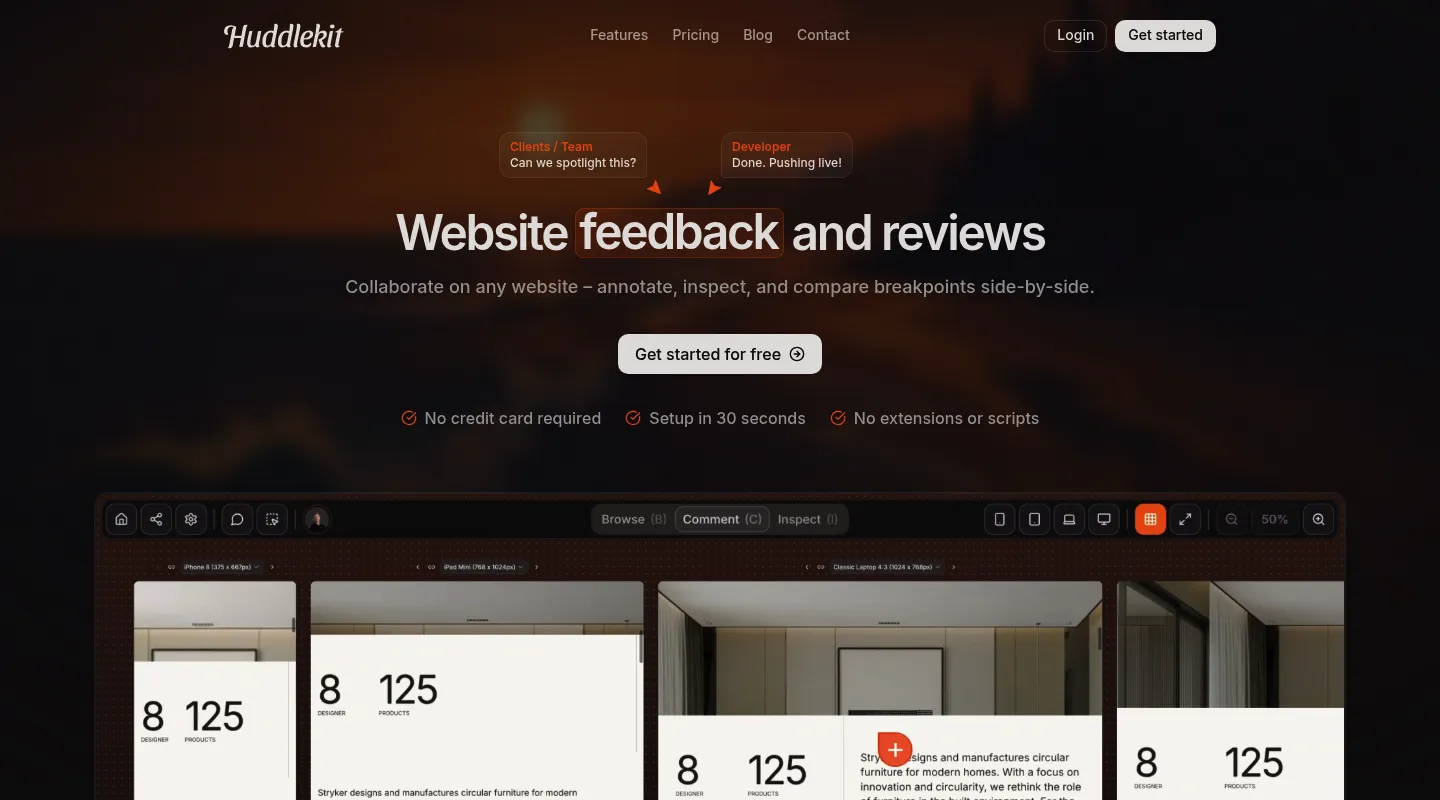
Huddlekit is built for agencies and freelancers who review websites with their clients. Paste a URL, share the link, and clients pin comments on the live or staging site.
Key differences from Filestage:
- Websites without setup: Website projects open from a URL, with no script on the site and nothing for reviewers to install. Staging sites behind a site password work too.
- Tools for the people fixing things: Switch between five breakpoints on every plan, or see them side by side in Canvas view on Pro and Team. Team members inspect fonts, spacing, and colors without DevTools, and each website comment saves a screenshot, the element's selector, the browser, and the viewport.
- Files in the same workspace: Media projects take JPEG, PNG, GIF, WebP, and AVIF images, PDFs, and MP4, WebM, or MOV videos, with video comments tied to a timestamp. On Pro and Team, a project holds up to 20 files. See Reviewing images, PDFs, and videos.
- Rounds instead of stages: For a new version, start a feedback round on the same project and link (Pro and Team). Upload the new files, the round starts clean, and earlier rounds stay readable.
- A board for the fixes: Every comment has a status and a card on the project board. Pro and Team can add statuses like Client review or Approved, up to 8 in all. Private team comments are on every plan; Filestage's start on Starter.
- Tracker sync on Team: Comments go to Linear, ClickUp, Notion, Trello, or Asana, plus Slack, Zapier, webhooks, and the API, all at $33/month billed yearly. On Pro and Team, Claude, Claude Code, Codex, or Cursor can work through comments over MCP.
Pricing: Free plan available (1 project, 3 team members, unlimited guests). Pro is $16/month billed yearly ($19 monthly) for 3 members, unlimited projects, and 5 GB storage; Team is $33/month billed yearly ($39 monthly) for 15 members and 50 GB. Every paid plan has a 30-day money-back guarantee.
Pros:
- Clients comment from a link with just a name and email
- Breakpoint previews, CSS inspection, and debug details with each website comment
- Paid plans from $16/month billed yearly, against Filestage's $199
Cons:
- No version comparison, approve or reject decisions, or reviewer stages
- No compliance sign-off such as verified approval or audit logs
- Feedback on images, PDFs, and videos is pinned comments, with no drawing tools
- Fewer file types: no audio, Office documents, or Adobe source files
Verdict: If most of what you review is a website and Filestage's approval machinery sits unused, Huddlekit does the part you use for a fraction of the price, plus the website tools a developer needs.
Best for: Agencies, studios, and freelancers whose clients review websites, with mockups, PDFs, and videos mixed in.
"We tried Markup, Ruttl, and a handful of other tools. Huddlekit was the first one that actually organized our feedback and felt easy enough for clients to use without a walkthrough." (George, Growth Lead @ Stormfors)
Paste a URL, share the link, and your client comments on the live site.
Try Huddlekit free2. Ziflow: best like-for-like proofing platform
To keep a Filestage-style approval workflow with a different vendor, Ziflow is the closest swap, at the same prices.
Key differences from Filestage:
- Sequential or parallel stages: Up to 2 workflow stages on Standard, 3 on Pro, and unlimited on Enterprise. Free has one.
- Version comparison on the free plan: Side-by-side, overlay, and pixel-level compare for static and video proofs on every plan. Filestage starts comparison on Starter.
- Live websites: Live or snapshot website proofs on every plan, with a resolution control on live proofs. Ziflow notes that screenshot capture for live web comments runs through a browser extension that Safari doesn't support.
- More users, a tighter free plan: 15 users on Standard and 20 on Pro, but Free proofs can only be opened for 60 days.
Pricing: Free plan (2 users, 2 GB, unlimited proofs and reviewers). Standard is $199/month billed annually ($249 monthly) and Pro is $329/month billed annually ($399 monthly). Enterprise is quoted.
Pros:
- Version comparison even on the free plan
- Over 1,200 file types, live websites, and HTML5 banners
Cons:
- The same $199/month floor as Filestage
- Resolving comments and the Slack, Asana, and Jira integrations need Pro
Best for: Creative and marketing teams who want Filestage's kind of approval workflow with more users per plan. More in our Ziflow alternatives guide.
3. PageProof: best for high-volume proofing at a flat price
PageProof is built for agencies and in-house teams proofing a lot of creative.
Key differences from Filestage:
- Unlimited storage: Every plan has unlimited proofs, reviewers, versions, and storage at a flat price.
- Proofing tools on the entry plan: Smart compare, automated workflows, a barcode scanner, spell check, color check, and ColorSep color separation previews are all on Team.
- Integrations on every plan: Adobe Creative Cloud, monday.com, Asana, Jira, Trello, Figma, Slack, and Microsoft Teams, among others. Filestage keeps Jira and monday.com for Business.
- An install for live websites: PageProof's help center says reviewers need its browser extension or desktop app to review live website URL proofs.
Pricing: Team is $249/month or $2,499/year; Team Plus is $499/month or $4,999/year; Enterprise is quoted. No free plan; a free trial is available on request.
Pros:
- Unlimited storage on every plan
- A deep set of print and packaging checks
Cons:
- No free plan to start on
- Private comments are Enterprise only, or a paid add-on on Team Plus
Best for: Agencies and brand teams proofing print, packaging, and campaign assets at volume. More in our PageProof alternatives guide.
4. GoVisually: best for small creative teams paying per user
GoVisually is a lighter proofing tool priced per user, with an AI compliance suite for consumer packaged goods brands.
Key differences from Filestage:
- Caps on the entry plan: Lite allows 15 active projects and up to 15 external reviewers, and doesn't support video or GIFs.
- Compare and approve: Side-by-side revision compare, approval checklists, and one-click approve or reject.
- Label compliance for CPG: A separate suite checks artwork against your own rules and 20+ regulatory frameworks, including FDA and EU.
Pricing: Lite is $16 per user per month billed annually, for 1 to 5 users. Pro is $33 per user per month billed annually, with a 3-user minimum. The CPG Compliance AI Suite has tailored pricing. No free plan, but there's a free trial.
Pros:
- Low entry price for one or two designers
- External reviewers comment without an account
Cons:
- No video on Lite, and a 15-reviewer cap
- Per-user pricing climbs as the team grows
Best for: Small design teams and CPG brands proofing artwork and packaging.
5. Frame.io: best for video teams
If most of what you proof is video, Adobe's Frame.io is built for it.
Key differences from Filestage:
- Video-first review: Frame-accurate and range-based comments, version stacks, and a comparison viewer on every plan, Free included.
- Editing-app integrations: Premiere and Final Cut Pro integrations on every plan, plus Camera to Cloud.
- Share links without accounts: Reviewers who aren't signed in give a name and email with their first comment.
Pricing: Free plan (2 members, 2 GB, 2 projects). Pro is $15 per member per month for up to 5 members, or $156 per member per year; Team is $25 per member per month for up to 15, or $264 per member per year. Enterprise is custom.
Pros:
- Frame-accurate, range-based video comments
- A free plan with version stacks and comparison
Cons:
- Per-member pricing adds up past a few people
- Made for media files, not website review
Best for: Video producers, editors, and agencies whose reviews are mostly footage and cuts.
When to stick with Filestage
Filestage is still the right call if:
- Files need formal sign-off through reviewer groups, with approve or request-changes decisions and due dates
- You compare versions often, including overlay and text compare
- Your content is regulated and you need verified approval or audit logs
- Most of your reviews are video, packaging, documents, and campaign assets, with websites on the side
When to switch, and to what
- Most of your work is websites, and clients review from a link → Huddlekit
- You want Filestage-style approvals with a free plan that compares versions → Ziflow
- You proof at volume and want flat pricing with unlimited storage → PageProof
- You're one or two designers and prefer paying per user → GoVisually
- Your reviews are mostly video → Frame.io
Making the switch
To move off Filestage:
- Download what you need to keep, such as final files or, on Business, PDF review reports
- Finish or archive active reviews so nothing is left half-approved
- Set up your new workspace and invite your team
- Share fresh review links with clients for the next round
In Huddlekit, a website project starts from its URL and a media project from an upload. Click Share, invite your client by email, and they comment without an account. Compare the plans, or get in touch for help moving a workflow across.
Keep the client feedback, skip the approval machinery.
Get startedFrequently asked questions
Is Filestage free, and how much does it cost?
There's a free plan with limits: 10 team members, 1 active project, 5 new files a month, and 2 GB of storage. As of November 26, 2026, Starter is $199/month billed yearly or $249 monthly, Business is $329/month billed yearly or $399 monthly, and Enterprise is custom. Paid plans add seats in bundles of 5, at a price the pricing page doesn't list. Huddlekit's free plan covers 1 project, 3 team members, and unlimited guests, and Pro is $16/month billed yearly ($19 monthly).
What's the cheapest Filestage alternative?
Huddlekit, Ziflow, and Frame.io have free plans (Ziflow's free proofs open for 60 days). On paid plans, Huddlekit Pro is $16/month billed yearly for a 3-member workspace, while Frame.io Pro is $15 per member per month and GoVisually Lite is $16 per user per month billed annually.
Can Huddlekit replace Filestage?
For client feedback on websites, images, PDFs, and videos, yes. For formal approval workflows, no: Huddlekit has no version comparison, approve or reject decisions, reviewer stages, or compliance sign-off. If you want a sign-off step, add a status such as Approved on Pro or Team. Guests can change a comment's status from the share link.
Do clients need an account to review in Huddlekit?
No. Invite clients by email from the Share window or send them the link yourself. The first time they comment, they give a name and email: no account, password, or extension. Guests are unlimited on every plan and never count as members. See Sharing projects with guests.
Can Huddlekit review PDFs and videos like Filestage?
It collects pinned comments on them, tied to a spot on a page or a moment in a video, with files up to 250 MB (images and PDFs) or 2 GB (video) on Team. It doesn't have Filestage's drawing tools, version compare, or audio support.
Conclusion
Filestage is a capable proofing platform, and for teams moving campaigns, packaging, and regulated content through formal approval, it earns its price. The mismatch comes when the work is mostly websites and the reviewers are clients who just need to point at things.
Pick by the job: Ziflow for the same kind of workflow with a free plan that compares versions, PageProof for volume at a flat price, GoVisually for a small team paying per user, Frame.io for video, and Huddlekit if your reviews are mostly websites with some files alongside.
See Huddlekit's plans, or read our guide to the best design review software for the wider field.